
Create animated web pages and banners
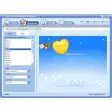
The popularity of Flash is now stronger than ever, and we’re starting to see some great examples of the program being used intelligently to create slick, original online content.Of course, you can’t just pick up a copy of the Macromedia heavyweight and start churning out sites like MTV. com in the first five minutes. KoolMoves makes for a great bite-sized introduction to Flash’s capabilities, allowing you to create graphics, animations, interfaces and page layouts through a slim-line interface.
The easy-to-access KoolMoves toolset hides a surprisingly large pot of features including text effects, image import, animation effects, tweening and the ability to add MP3 or WAV files to your creations.The simplicity of KoolMoves is enhanced by the inclusion of a series of wonderful interactive tutorials, comprehensive Help section and a range of preset layouts and templates.Once you’ve finished your masterpiece on KoolMoves, it proves very simple to export it as a SWF file in a matter of seconds. Disappointingly, KoolMoves's trial version doesn’t allow you to save the finished results, but the very reasonable price of the full program is well worth shelling out in order to find your feet in the world of Flash.Even seasoned Flash developers may find KoolMoves useful to use the program as an alternative, especially as it now includes a range of ActionScript features.
Added a new gui mode called Html5 for Mobile Devices -- export is Html5 using the new canvas tag, not yet supported by IE.Added single key short cuts for commonly used commands (select, fill, add text, scale, rotate, edit properties, edit frame action script).Fixed problem with copy/paste menu component to same frame.Fixed some AS3 problems associated with minimalComps package.
Changes
Added a new gui mode called Html5 for Mobile Devices -- export is Html5 using the new canvas tag, not yet supported by IE.Added single key short cuts for commonly used commands (select, fill, add text, scale, rotate, edit properties, edit frame action script).Fixed problem with copy/paste menu component to same frame.Fixed some AS3 problems associated with minimalComps package.


























User reviews about KoolMoves
by Anonymous
Pricing and Charge.
Hello,
We are Roofings Group Uganda and would like to purchase this software.
Could you please send us details of how we can go about this in purchase.contact: roofingsgroup@roofings.co.ug